Patient Linking
Management Portal users are able to manually link and unlink a patient's transactional record to a regulatory patient profile.
Link a transactional record to a regulatory patient profile
You can link a transactional record to an existing regulatory patient profile.
-
Search for a patient with a regulatory patient profile that is not already linked to a transactional record.
Regulatory patient profiles that are not linked to a transactional record display in the Record Type field.
-
Click the record to open it, then click Linking at the top.
The Linking popup displays.
-
Click Link.
-
Search for the patient that you want to link to the regulatory patient profile.
Only unlinked transactional records are returned in the search results.
-
Click to select the patient that you want to link and then click the Link button.

The regulatory patient profile displays with the success message:
If you want to view the patient's transactional record, click Medications.
If you want to view the patient's linking history, click Linking. See also View linking history
Unlink a transactional record from a regulatory patient profile
You can unlink a transactional record that was linked either manually or automatically to a regulatory patient profile.
-
Search for a patient with a regulatory patient profile that is linked to a transactional record.
Regulatory patient profiles that are linked to a transactional record display in the Record Type field.
-
Click Linking at the top.
The Linking popup displays.
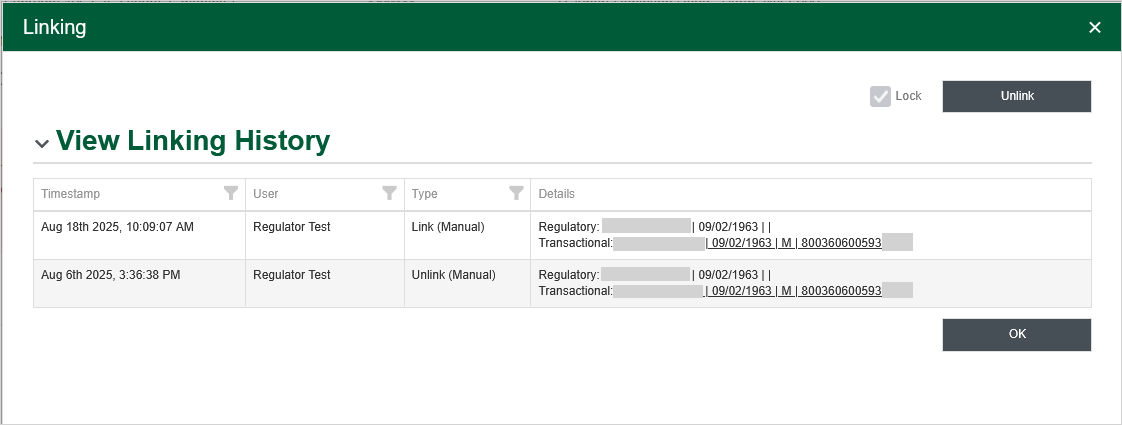
-
Click Unlink.
The regulatory patient profile displays with the success message:
Lock automatically linked profiles
Regulatory profiles and transactional records can also be linked and unlinked through an automatic process—for example, if a name is changed in one of the profiles. If you want to preserve the linkage between an automatically linked regulatory profile and transactional record, you can lock them.
-
Search for a patient with a regulatory patient profile that has been linked to a transactional record.
Regulatory patient profiles that are linked to a transactional record display in the Record Type field.
-
Open the record.
The transactional record displays.
-
Click Linking. The Linking popup displays.
Automated linking events are not shown in the linking history.
-
Select the Lock checkbox.
The regulatory patient profile displays with the success message:
View linking history
-
Search for a patient with a regulatory patient profile.
Regulatory patient profiles can be either linked or unlinked, displaying either or in the Record Type field.
-
Open the patient record.
-
If you are viewing a linked patient, the transactional record (medication history) is displayed first. You will need to click Patient Profile to view the regulatory patient profile.
-
Click Linking at the top.
The Linking popup displays.
Under View Linking History, a grid displays showing the history of any manual linking, unlinking or locking events.
Automated linking events are not shown in the linking history.
Each row in the grid displays:
-
Timestamp - Date and time of the linking event.
-
User - User who performed the linking event.
-
Type - One of the following:
-
Link (Manual) - the regulatory profile and transactional record were manually linked.
-
Unlink (Manual) - the regulatory profile and transactional record were manually unlinked.
-
Link (Lock) - the regulatory profile and transactional record that were previously automatically linked have been manually locked to prevent them from being unlinked by an automated linking process.
-
-
Details - Includes the name, date of birth, and gender for the regulatory patient and the transactional patient. The transactional patient contains a hyperlink, which you can click to view the transactional patient profile in a new browser tab.
-
What do the icons on the Linking button mean?
As a Management Portal user with the required permissions, when you view a patient's regulatory profile, you will see a Linking button at the top of the screen. This button may also display icons that provide more information about the link status.
| If you see... | The regulatory profile is... |
|---|---|
| Not linked to a transactional record. | |
| Linked (automatically) to a transactional record. | |
|
Linked (manually) to a transactional record. (This also includes the scenario where the regulatory patient profile was created from a transactional record. --or-- Linked (automatically) to a transactional record, then subsequently locked. |